MISP Auto-Update
Automatically synchronize Stories to MISP events
Assess is the analyst queue for collected Stories and News Items. It supports search, filtering, sorting, merging, bookmarks, report assignment, connector sharing, and review state changes.
Use the Assess sidebar search for Story text search inside the current Assess view. Use the global Omnisearch field to search across Stories, Reports, and Products, or to open Assess with filter tokens such as:
story: source:"CERT.at" tag:ransomware read:false range:last7
For natural-language questions and summaries, use Chat when enabled. Search answers link back to Assess with the generated filters applied.
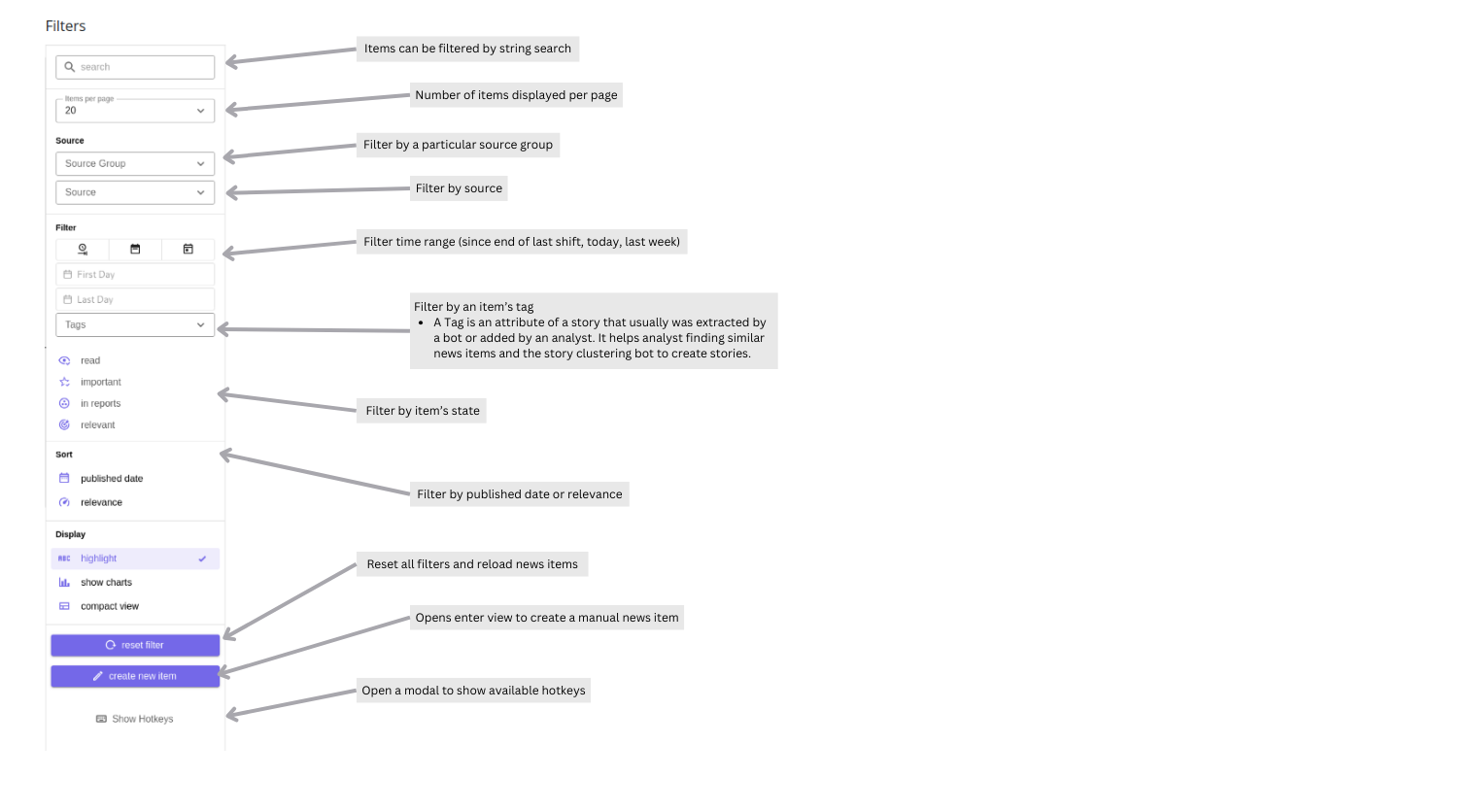
For manually created stories, the “updated” timestamp is essentially the creation time. As a result, filtering by Last day for a manually created story will not return it, even if an older “published date” is set.
Assess filters include search text, source, source group, tag, language, read state, important state, report membership, relevance, cybersecurity classification, changed-by actor, date range, and sort order.
Users can save the current Assess filters from the Saved filters button. A saved filter can be marked as the default for the user profile. Dashboard shortcuts show saved Assess filters so frequently used queues can be opened directly. See Filter Lists and Saved Filters.
News items collected by Collectors become visible in Assess. They can be grouped into Stories automatically by Bots or manually by analysts.
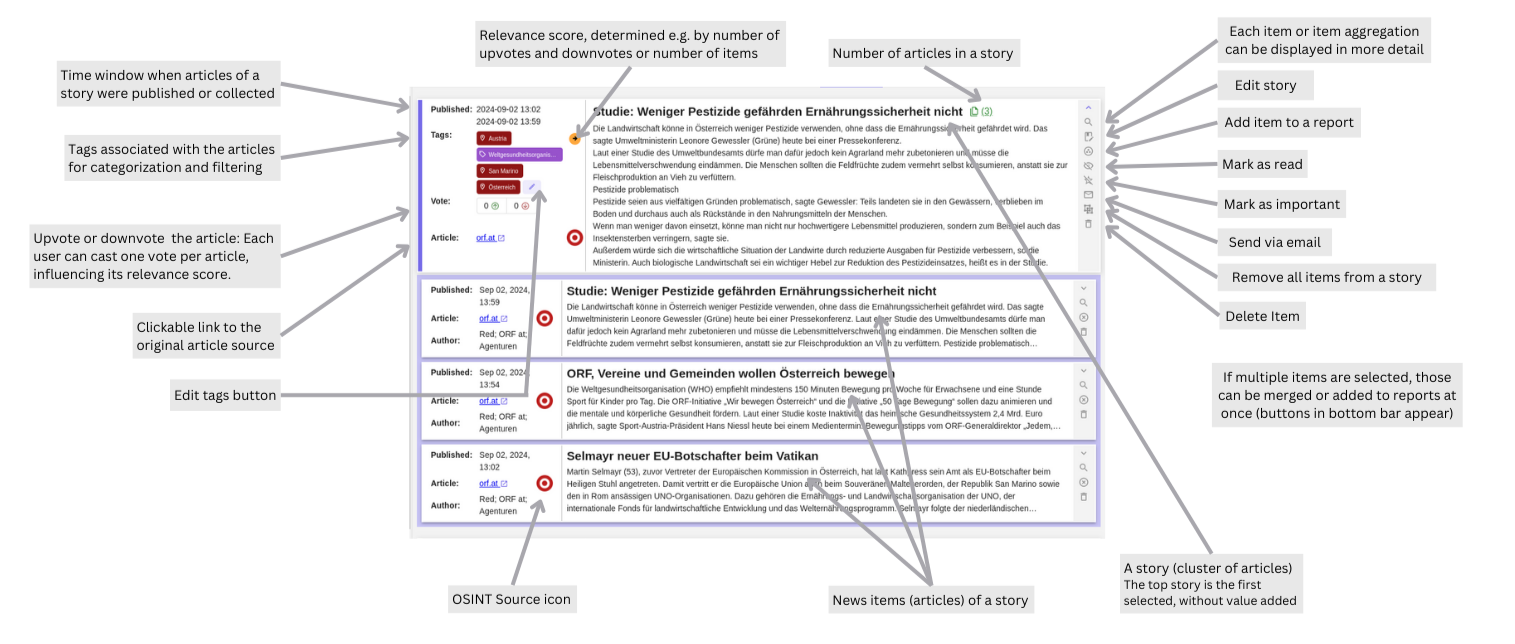
Detail view:
Charts:
Story actions include marking read/unread, marking important, sharing to connectors, ungrouping, version history, deleting, editing, adding to reports, and bookmarking. Bulk actions are available after selecting stories; visible shortcuts include Shift+R for adding to a report and Shift+B for bookmarking.
Use Share → Export to JSON to transfer an individual Story or a selection of Stories. Import either an Assess or Admin export through Create manual news item → Create from file or Admin → Settings → Import Stories. Both import screens accept complete Stories, including exports with metadata.
Stories are the primary transfer format. Existing standalone News Item JSON can also be imported; each item receives a new parent Story. Transfers do not restore all instance state and do not merge or overwrite existing content. See Story import and export for formats, permissions, and limitations.
Stories keep a revision history. Use Version History from the Story actions menu to inspect saved revisions and compare the changes between adjacent revisions. Revision diffs are intended for audit and troubleshooting; they do not currently provide rollback.
Bookmark collections are private per user. A story can be bookmarked from its action menu, or selected stories can be added to an existing or new collection from the Assess toolbar. If a user bookmarks a single story before creating any collections, Taranis AI creates a default collection named Bookmarks.
The Assess page shows up to six bookmark collections in a compact bar. Use All bookmarks to open the full bookmark page, rename or delete collections, reorder them, and remove stories from a collection. Removing a story from a bookmark collection does not delete the story from Assess. See Bookmarks.
The Story Edit view can expose AI assisted actions when advanced story options are enabled in user settings. Available actions include generating a summary and title, and running sentiment analysis. When sentiment attributes are present, the advanced view shows the story sentiment status.
Automatically synchronize Stories to MISP events
Use dynamic Assess filter lists and save reusable queues.
Save private Story collections for follow-up work.
Share Stories between Taranis AI instances and import existing News Item JSON.