Omnisearch is the global search field in the top navigation. It is useful for quick lookup across the analyst workflow and for jumping directly into filtered list views.
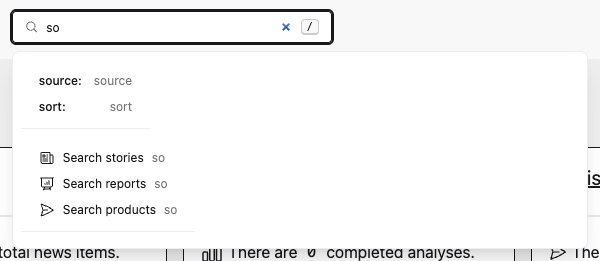
Scope search
An unqualified search shows grouped results for Stories, Reports, and Products. Use a scope prefix to search only one area and open its list view directly:
story: ransomware
report: weekly
product: stix
Supported aliases:
| Scope | Aliases |
|---|---|
| Stories | story:, stories:, assess: |
| Reports | report:, reports:, analyze:, analysis: |
| Products | product:, products:, publish: |
report:true and report:false are reserved for Assess filtering. If you need to find a Report literally named true or false, use an unqualified global search.
Assess filter syntax
Omnisearch can translate Assess-style filter tokens into the Assess sidebar query parameters. Tokens can be combined with free text:
story: source:"CERT.at" tag:ransomware read:false important:true range:last7 sort:updated_desc
Supported Assess tokens:
| Token | Values |
|---|---|
source: | Source name or source ID |
group: | Source group name or group ID |
tag: or tags: | Tag value |
read: | true, false |
important: | true, false |
relevant: | true, false |
in-report: or report: | true, false |
cybersecurity: or cyber: | yes, no, mixed, incomplete |
changed-by: | me |
range: | shift, 24h, week, day, month, last7, or last<N> |
from: | Date or datetime value |
to: | Date or datetime value |
sort: | date_desc, date_asc, relevance, updated_desc, updated_asc |
Quote values that contain spaces. Omnisearch suggestions are loaded only when the query needs them, so normal global searches do not require loading every Assess filter list.
Saved filters
Assess sidebar filters can be saved per user. One saved filter can be marked as the default, which makes /assess open that filtered queue automatically. Use /assess?reset=true to bypass the default and show the unfiltered list.
Saved filters also appear as dashboard shortcuts, so common queues such as “Unread important stories” can be opened without rebuilding the filter each time. See Filter Lists and Saved Filters.