Developers
See docker/dev for instructions on how to start at dev setup.
This is the multi-page printable view of this section. Click here to print.
See docker/dev for instructions on how to start at dev setup.
Install from stable release
curl -fsSL https://taranis.ai/install.sh | bash
Clone via git
git clone --depth 1  https://github.com/taranis-ai/taranis-ai
cd taranis-ai/docker/
Copy env.sample to .env
cp env.sample .env
Open .env and change the defaults before exposing the instance on a network. More details about environment variables can be found in the docker README.
Taranis AI uses Redis and RQ for worker queues, scheduled jobs, and frontend cache storage.
| Variable | Used by | Purpose |
|---|---|---|
REDIS_URL | core, frontend, workers | Redis connection URL for RQ queues and cache fallback. |
REDIS_PASSWORD | core, frontend, workers | Redis password. Set this in production. |
CACHE_REDIS_URL | core, frontend | Optional dedicated Redis URL for frontend cache and cache invalidation. Falls back to REDIS_URL. |
CACHE_REDIS_PASSWORD | core, frontend | Optional dedicated cache Redis password. Falls back to REDIS_PASSWORD. |
RQ_DEFAULT_JOB_TIMEOUT | core | Default RQ job timeout in seconds for queued worker tasks. Default: 180. |
The Compose deployment wires Redis into core, frontend, collector, cron, and workers. If queued jobs are accepted but not processed, verify that Redis is reachable and at least one worker container is running.
See Background Jobs for Redis/RQ architecture, health checks, scheduled jobs, and upgrade notes.
The Compose deployment includes the optional llm-bot service for LLM-backed summaries, title generation, NER, clustering, and sentiment.
| Variable | Purpose |
|---|---|
BOT_API_KEY | Shared secret used by workers when calling bot services. |
LLM_BASE_URL | Base URL of the upstream OpenAI-compatible API. |
LLM_API_KEY | Upstream API key. |
LLM_MODEL | Model name, unless the upstream provides a default. |
LLM_TIMEOUT | Upstream request timeout in seconds. |
LLM_BOT_PORT | Internal llm-bot port, default 8000. |
See LLM Bot Service for endpoint mapping and bot configuration.
Optional Chat is disabled by default. Enable CHAT_ENABLED=true on core and frontend, then configure the provider in Admin Settings > Chat. Chat uses Redis and calls its provider directly from core, independently of llm-bot and workers.
See Chat deployment for setup, proxy timeouts, validation, and disabling the feature while preserving history.
Taranis AI images are tagged as follows:
1.1.7)stable)latest)See Internal TLS Configuration for setting up TLS encryption and Advanced monitoring for more logging insights. For detailed information about container tags, release strategy, and deployment recommendations, see Releases and Container Tags.
Pull the configured release images before starting or upgrading:
docker compose pull
Start the application:
docker compose up -d
Verify readiness:
curl -fsS http://<url>:<TARANIS_PORT>/api/health
docker compose ps
Use the application:
http://<url>:<TARANIS_PORT>/login
The default credentials are user / user and admin / admin. Change them before production use.
The passwords for these two default users can be overridden by setting the environment variables PRE_SEED_PASSWORD_ADMIN or PRE_SEED_PASSWORD_USER before first launch.
Afterwards they are stored in the database in the user table.
For existing database-auth users, passwords and role assignments can be repaired with the operational CLI. See User Management.
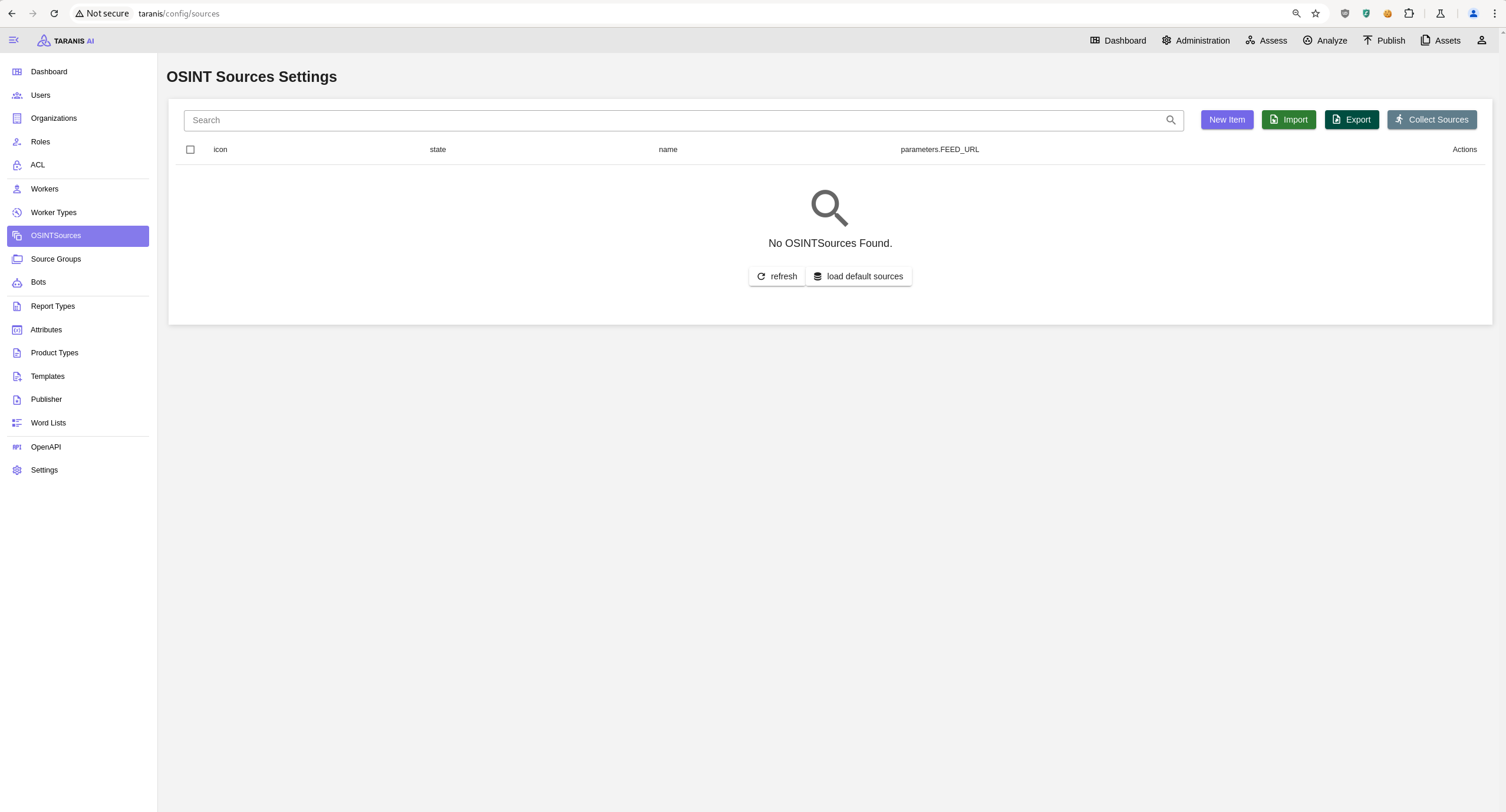
Open http://<url>:<TARANIS_PORT>/config/sources and click load default sources to import the default sources from: default_sources.json
Or import a source export via the Import.
Clone via git
git clone --depth 1  https://github.com/taranis-ai/taranis-ai
cd taranis-ai/docker/
Copy env.sample to .env
cp env.sample .env
Open file .env and change defaults if needed. More details about environment variables can be found here.
See Internal TLS Configuration for setting up TLS encryption and Advanced monitoring for more logging insights. See Releases and Container Tags for information about container image versions, Internal TLS Configuration for setting up TLS encryption, and Advanced monitoring for more logging insights.
Download and install kompose.io
# resovle variables from .env into taranis-ai/docker/compose.yml
docker compose config > resolved-compose.yml

# convert compose file to kubernetes
kompose --file resolved-compose.yaml convert
If you want to connect to a kubernetes cluster you can do something like this:
kubectl create ns db
helm repo add bitnami https://charts.bitnami.com/bitnami
helm repo update

helm install pg-ha bitnami/postgresql-ha -n db \
  --set postgresql.username=app \
  --set postgresql.password=apppass \
  --set postgresql.database=appdb \
  --set pgpool.adminUsername=pgpool \
  --set pgpool.adminPassword=pgpoolpass \
  --set postgresql.replicaCount=2

kubectl -n db port-forward statefulset/pg-ha-postgresql 54321:5432 &
kubectl -n db port-forward pod/pg-ha-postgresql-1 54322:5432 &
And then connect with:
SQLALCHEMY_DATABASE_URI="postgresql+psycopg://app:apppass@/appdb?host=127.0.0.1,127.0.0.1&port=54321,54322&target_session_attrs=read-write&connect_timeout=3"
Taranis AI publishes container images to GitHub Container Registry (ghcr.io) with different tagging strategies for core services and bots.
All images are available at GitHub Container Registry.
Core Taranis AI services follow a stable and tested release process:
| Tag | Description | Use Case | Stability |
|---|---|---|---|
stable | Latest manually tested and verified release | Production deployments | ✅ High |
1.2.3 (semver) | Specific version (semantic versioning) | Pinned production deployments | ✅ High |
latest | Latest build from main branch | Development/testing only | ⚠️ May contain bugs |
Only upgrades to the immediately following Taranis AI release are tested and supported. For a larger version gap, upgrade one release at a time and verify the deployment after every step.
Review the GitHub release notes before each upgrade. Follow Maintenance for the upgrade, verification, and rollback procedure.
Bot containers follow a similar release process, with versions decoupled from the core Taranis AI services:
| Tag | Description | Use Case | Stability |
|---|---|---|---|
stable | Latest manually tested and verified release | Production deployments | ✅ High |
1.2.3 (semver) | Specific version (semantic versioning) | Pinned production deployments | ✅ High |
latest | Latest build from main branch | Development/testing only | ⚠️ May contain bugs |
For the best experience using Taranis AI, we recommend that your system meet the following requirements:
| Resource | Minimal (w/o bots) | Recommended |
|---|---|---|
| CPU | 2 cores | 12 cores |
| RAM | 2 GB | 16 GB |
| Storage | 16 GB | 40 GB |
Note: The recommended requirements assume that all bots are active concurrently. You can estimate the requirements for running only some of the bots from this table:
| Bot | CPUs | RAM | Storage |
|---|---|---|---|
| cybersec-classifier | 2 | 2.0 GB | 8.3 GB |
| NER | 2 | 7.0 GB | 8.38 GB |
| story-clustering | 2 | 1.5 GB | 6.8 GB |
| summary | 2 | 1.5 GB | 8.4 GB |
| sentiment-analysis | 2 | 2.5 GB | 8.12 GB |
You can assume the number of CPUs and RAM to be cumulative, so for running two bots concurrently, sum up the required number of CPUs and RAM. Reserve an additional 2 CPUs and 2 GB RAM for normal system operation.
Example: For running story-clustering and NER bots at the same time, your system should have 6 CPUs and 10.5 GB of RAM.
GPU support for accelerating bot performance will be available soon. Further details and configuration options will be provided once this feature is launched.
Taranis AI uses Redis and RQ for background work. Collection, bots, presenters, publishers, connectors, and maintenance jobs are queued by core and processed by worker containers.
| Service | Purpose |
|---|---|
redis | Queue broker, job state, scheduler state, and cache storage. |
core | Creates jobs, stores scheduled job definitions, and exposes /api/health. |
collector | Runs collector jobs from the collector queue. |
workers | Runs bots, presenters, publishers, connectors, and miscellaneous jobs. |
cron | Runs taranis-cron, reads Redis scheduler definitions, and enqueues due jobs. |
Queues are split by worker category: collectors, bots, presenters, publishers, connectors, and misc.
Set a Redis password for production and keep Redis private to the Compose or Kubernetes network.
| Variable | Purpose |
|---|---|
REDIS_URL | Redis connection URL used by core, frontend, and workers. |
REDIS_PASSWORD | Redis password. |
CACHE_REDIS_URL | Optional dedicated Redis URL for frontend cache. Falls back to REDIS_URL. |
CACHE_REDIS_PASSWORD | Optional dedicated cache password. Falls back to REDIS_PASSWORD. |
RQ_DEFAULT_JOB_TIMEOUT | Default queued job timeout in seconds. |
Do not publish the Redis port unless you have a controlled operational reason.
Core exposes:
GET /api/health
The response reports database, seed_data, broker, and workers. If Redis is up but no workers are connected, queued jobs can be accepted but will not run until a worker starts.
Example degraded response:
{
  "healthy": false,
  "services": {
    "database": "up",
    "seed_data": "up",
    "broker": "up",
    "workers": "down"
  }
}
When workers is down, check the collector, workers, and cron containers or deployments first, then inspect worker logs for bad WORKER_TYPES, invalid API keys, Redis authentication failures, or failed bot service calls.
The task and Failed Jobs views report terminal RQ failures: unhandled task exceptions, job timeouts, and killed workhorse processes. Failed Jobs includes RQ’s exception detail when it is available.
A queued job without a worker, a late schedule, or a blocked queue is an operational liveness problem, not a recorded task failure. Check /api/health, the worker containers, and Redis connectivity before treating it as a failed task.
Collectors and bots use cron-like schedules. Core stores managed schedule definitions in Redis, and the cron service reconciles those definitions with enabled sources and bots. Changing a collector or bot schedule does not require restarting the workers.
The worker admin views show queued, active, failed, and scheduled jobs. Use them before clearing queues so you know what work will be lost.
Taranis AI 1.4.0 replaced Celery/RabbitMQ with Redis/RQ. There is no queue handover from Celery to RQ. Before upgrading an older deployment, let running Celery jobs finish, stop the old workers, then deploy the Redis, collector, workers, and cron services together.
llm-bot is an optional HTTP service used by worker bots for LLM-backed analysis. The Compose deployment includes it as ghcr.io/taranis-ai/taranis-llm-bot:${TARANIS_BOT_TAG:-stable}.
It talks to an OpenAI-compatible Responses API and exposes endpoints for:
| Endpoint | Purpose |
|---|---|
/summarize | Generate a story summary. |
/title | Generate a concise story title. |
/ner | Extract named entities. |
/cluster | Cluster related stories. |
/sentiment | Analyze sentiment. |
/ner-link | Extract entities and link them to candidates. |
/link | Link supplied entities to candidates. |
/health | Readiness check. |
/info | Non-secret service capabilities and active config. |
Set these values in docker/.env:
| Variable | Purpose |
|---|---|
BOT_API_KEY | Shared secret used by workers when calling bot services. |
LLM_BASE_URL | Base URL of the upstream OpenAI-compatible API. |
LLM_API_KEY | Upstream API key. |
LLM_MODEL | Model name, unless the upstream provides a default. |
LLM_TIMEOUT | Upstream request timeout in seconds. |
LLM_BOT_PORT | Internal service port, default 8000. |
Advanced optional settings:
| Variable | Purpose |
|---|---|
LLM_REASONING_PROFILE | Prompt handling profile for models that emit reasoning text. Supported values include none, ministral, and gemma. |
LLM_REASONING_EFFORT | Optional upstream reasoning effort value, for example low, medium, or high. |
LLM_STRIP_REASONING_OUTPUT | Strip reasoning blocks before parsing model output. |
LLM_PARSE_REASONING_AS_OUTPUT | Use structured reasoning text as fallback output when the provider emits no final message. |
LOOKUP_BASE_URL | Optional lookup API used by entity linking. |
LOOKUP_API_KEY | API key for the lookup API. |
LOOKUP_DEFAULT_LANGUAGE | Default language for entity lookup. |
LOOKUP_CANDIDATE_LIMIT | Number of lookup candidates considered per entity. |
NER_LINKING_ENABLED | Enables linked NER output paths. |
NER_LINKING_MODE | deterministic or llm. |
SUMMARY_ROUTE_PATH | Override the summary route path. Default: /summarize. |
NER_ROUTE_PATH | Override the NER route path. Default: /ner. |
Keep LLM_API_KEY, BOT_API_KEY, and any provider credentials out of logs and shared files. The service should stay on the private application network; do not publish it directly to the internet.
The Compose deployment wires these worker endpoints to llm-bot by default:
| Worker variable | Default endpoint |
|---|---|
SUMMARY_API_ENDPOINT | http://llm-bot:8000/summarize |
NLP_API_ENDPOINT | http://llm-bot:8000/ner |
STORY_API_ENDPOINT | http://llm-bot:8000/cluster |
Bot endpoint parameters saved in the admin UI take precedence over worker defaults. If an upgraded instance still has old standalone bot hostnames such as http://summary_bot:8000, http://nlp_bot:8000, or http://story_bot:8000, update those bot parameters to the llm-bot endpoints or clear the override.
For title generation, set TITLE_ENDPOINT on the Summary Bot to:
http://llm-bot:8000/title
For sentiment analysis, set the Sentiment Analysis Bot BOT_ENDPOINT to:
http://llm-bot:8000/sentiment
Each bot can override the default endpoint and timeout with its own parameters. See Bots for the user-facing bot settings.
Canonical llm-bot paths are accepted with or without a trailing slash.
Check service health from inside the application network:
curl http://llm-bot:8000/health
If API_KEY is configured on the service, protected task endpoints require:
Authorization: Bearer <BOT_API_KEY>
Use /info to confirm endpoint paths and non-secret feature settings. It reports whether lookup and linking are configured without exposing API keys.
Analyst Chat is optional and disabled by default. It requires core, frontend, the application database, Redis, and a reachable provider supporting Responses or Chat Completions with function calling. Core calls the provider directly; Chat does not require llm-bot or workers.
For the standard Compose deployment, set this in .env:
CHAT_ENABLED=true
The shipped Compose configuration passes this flag to both core and frontend. Custom deployments must enable it on both services. For Kubernetes, set CHAT_ENABLED: "true" in the deployment ConfigMap; for Helm, set config.chatEnabled: "true".
Use published application images containing Chat support. From the Compose deployment directory, pull the configured images and recreate the application services:
docker compose pull core frontend
docker compose up -d core frontend
docker compose ps
Check /api/health at your deployment URL and confirm database and Redis health in the Admin Dashboard. Then open Administration > Settings > Chat and configure the provider. Only CHAT_ENABLED is a deployment environment setting for Chat; the provider URL, API format, model, key, timeout, and Story limit are saved in Admin Settings.
Analysts need ASSESS_ACCESS. Verify a general answer, a Story search and its Assess link, and saved conversation history before making Chat available to analysts. A visible Chat navigation item alone does not confirm that the provider is working.
Redis coordinates concurrent requests. If it is unavailable, new messages fail with Chat is temporarily unavailable. Check Redis connectivity from core when this occurs.
With REALTIME_ENABLED=true and live updates connected, analysts receive progress stages and streamed answer text. Realtime is optional: the completed answer still arrives through the normal HTTP response.
A Chat turn has an overall 540-second deadline. The frontend waits up to 600 seconds for core. The shipped ingress allows 660 seconds between upstream reads for Chat requests. Configure custom or outer reverse proxies with a Chat response timeout of at least 660 seconds, including any application base path. Progress updates use a separate connection and do not keep the message POST alive.
Provider settings apply on the next message, but changing CHAT_ENABLED requires restarting or recreating core and frontend. Startup creates the Chat tables. Include conversations and provider settings in your database backup and access-control planning; see privacy and storage.
Set CHAT_ENABLED=false for both core and frontend and recreate those services. This removes Chat from navigation and disables the API while preserving conversations and settings. Re-enabling Chat restores access to saved history.
If rolling back application images, restore the previously deployed image tags and follow the same pull, recreate, and health-check steps. Older images ignore the Chat tables; disabling the feature does not require dropping them.
Use published images for deployment upgrades. Do not build application images on production hosts unless you are intentionally testing a custom build.
Only upgrades to the immediately following Taranis AI release are tested and supported. For a larger version gap, upgrade one release at a time and verify the deployment after every step.
cd taranis-ai/docker
docker compose pull
docker compose up -d
curl -fsS http://<url>:<TARANIS_PORT>/api/health
docker compose ps
For rollback, pin TARANIS_TAG and TARANIS_BOT_TAG to the previous known-good release in .env, pull, restart, and verify /api/health again.
Taranis AI 1.4.0 replaced Celery/RabbitMQ with Redis/RQ. There is no queue handover from old Celery workers to the new RQ workers.
Before upgrading an older deployment:
collector, workers, and cron services./api/health reports database, seed data, broker, and workers as up.See Background Jobs for the current worker architecture.
Supported upgrade of PostgreSQL 14.x to PostgreSQL 17.x. Expect Taranis AI downtime during the database upgrade.
docker/compose.yml file.docker/compose.yml) is setup to use the image of PostgreSQL 17 (check your POSTGRES_TAG variable in the .env file)taranis-ai/dockerupgrade-database.sh is executable./upgrade-database.shAll containers should now be up and running again. Verify /api/health and review database logs before handing the instance back to users.
SENTRY_DSN) ready.Sentry is a monitoring tool that enables more insights about an application. Taranis AI takes advantage of this if you enable it at the start up.
Sentry can be used to monitor insights about GUI, Core and database. In Taranis AI: Issues, Traces, Profiles and Queries can be tracked.
The core service exposes /api/health for readiness and dependency checks. It reports the database, seed data, Redis broker, and worker status when those services are available.
Worker-backed actions such as collecting an OSINT source, running a bot, gathering a word list, rendering a product, or publishing a product can be queued even when no workers are connected. In that case the frontend shows a warning that the task was queued but may not be processed until a worker starts.
If this warning appears:
REDIS_URL and REDIS_PASSWORD.collector, cron, and workers containers or Kubernetes deployments are running.WORKER_TYPES, or authentication errors against core.See Background Jobs for worker services, queues, scheduler behavior, and Redis/RQ upgrade notes.
Core audit logging is enabled by default. It writes structured JSON events to stdout for human-authenticated write requests and login attempts. Events contain request metadata such as the timestamp, path, status, user, and client IP; they never include request bodies, credentials, tokens, or other secrets.
Set AUDIT_LOG_ENABLED=false only when log collection is not appropriate for the deployment. Send the core container’s stdout to your normal log collector for retention and search.
To enable Sentry, set the SENTRY_DSN variables in the .env file before start of the application. More details about environment variables can be found here.
To gain insights about GUI, use the TARANIS_GUI_SENTRY_DSN variable and set it to your Sentry DSN address.
To gain insights about Core and database, use the TARANIS_CORE_SENTRY_DSN variable and set it to your Sentry DSN address.
This guide explains how to configure TLS (Transport Layer Security) for Taranis AI using the Granian ASGI server. TLS provides encrypted communication between clients and the server, essential for secure deployments.
The primary TLS configuration is handled through Granian environment variables:
For a basic TLS setup, configure these environment variables:
# SSL Certificate file path
GRANIAN_SSL_CERTIFICATE=/path/to/your/certificate.pem

# SSL Private key file path
GRANIAN_SSL_KEYFILE=/path/to/your/private_key.pem

# Turn off verification of self-signed certificates in Frontend and Worker service
SSL_VERIFICATION=False

DISABLE_SSE=True
When enabling TLS, you must also update the core URL to use HTTPS:
# Update the core API URL to use HTTPS
TARANIS_CORE_URL=https://your-domain.com/api
This variable affects multiple components:
TARANIS_CORE_URL to communicate with the core APITARANIS_CORE_URL for API communication (falls back to http://{TARANIS_CORE_HOST}{TARANIS_BASE_PATH}api if not set)TARANIS_CORE_API in config.jsonMore Granian environmental variables that affect SSL are derived from the CLI options prefixed with --ssl-*.
Examples:
GRANIAN_SSL_KEYFILE_PASSWORD
GRANIAN_SSL_CA
GRANIAN_SSL_CRL
GRANIAN_SSL_CLIENT_VERIFY
Make sure, all variables are properly set in the compose file. The variable SSL_VERIFICATION can be set for the frontend and worker service.
./certs:/certs:ro)SSL_VERIFICATION=False)https:// prefix. Moreover, the Certificate Authority needs to be added into the container’s trust store by mounting it under /usr/local/share/… Read more at docker.com.Here’s an example Docker Compose configuration with TLS enabled:
services:
  core:
    image: ghcr.io/taranis-ai/taranis-core:latest
    environment:
      # TLS configuration (paths must match the mounted cert directory)
      - GRANIAN_SSL_CERTIFICATE=/certs/certificate.pem
      - GRANIAN_SSL_KEYFILE=/certs/private_key.pem

      - TARANIS_CORE_URL=https://your-domain.com/api
      - DB_URL=database
      - DB_DATABASE=taranis
      - DB_USER=taranis
      - DB_PASSWORD=supersecret
      - API_KEY=your-secure-api-key
      - JWT_SECRET_KEY=your-secure-jwt-secret

    volumes:
      # Mount local certificate directory into the container
      - ./certs:/certs:ro
      - core_data:/app/data

    depends_on:
      - database
      - rabbitmq

    ports:
      - "8443:8080"

    networks:
      - taranis_network

    healthcheck:
      test: ["CMD-SHELL", "curl --fail https://localhost:8080/api/health || exit 1"]
      interval: 90s
      timeout: 30s
      retries: 5
      start_period: 40s

volumes:
  core_data:

networks:
  taranis_network:
    driver: bridge
For Kubernetes deployments, configure TLS using ConfigMaps and Secrets:
# TLS Secret
apiVersion: v1
kind: Secret
metadata:
  name: taranis-tls
type: kubernetes.io/tls
data:
  tls.crt: <base64-encoded-certificate>
  tls.key: <base64-encoded-private-key>

---
# Core Deployment with TLS
apiVersion: apps/v1
kind: Deployment
metadata:
  name: taranis-core
spec:
  replicas: 1
  selector:
    matchLabels:
      app: taranis-core
  template:
    metadata:
      labels:
        app: taranis-core
    spec:
      containers:
      - name: core
        image: ghcr.io/taranis-ai/taranis-core:latest
        env:
        - name: GRANIAN_SSL_CERTIFICATE
          value: "/certs/tls.crt"
        - name: GRANIAN_SSL_KEYFILE
          value: "/certs/tls.key"
        - name: TARANIS_CORE_URL
          value: "https://your-domain.com/api"
        - name: API_KEY
          valueFrom:
            secretKeyRef:
              name: taranis-secrets
              key: api-key
        - name: JWT_SECRET_KEY
          valueFrom:
            secretKeyRef:
              name: taranis-secrets
              key: jwt-secret
        volumeMounts:
        - name: tls-certs
          mountPath: /certs
          readOnly: true
      volumes:
      - name: tls-certs
        secret:
          secretName: taranis-tls
Corrensponds to Taranis release 1.2.4